Category: DeepSeek Help

  • What DeepSeek Unchained Can Do: Memory Banks, Smart Model Selection, and Real-Time Gauges

    DeepSeek Unchained is built to make serious AI useful on your own computer without turning the experience into a technical setup project. You can chat, work with documents, build reusable Memory Banks, let the app choose the right model for your hardware, and watch real-time gauges so you understand what is happening while the AI runs.

    The app has a lot inside it, but the important parts are practical: better answers, less manual setup, more privacy for local work, and clearer feedback when your machine is close to its limits.

    Memory Banks: reusable knowledge for your AI

    Memory Banks let you turn folders of documents into reusable knowledge the AI can consult during a conversation. Instead of pasting the same background information over and over, you create a Memory Bank once, activate it for a chat, and ask questions naturally.

    Behind the scenes, DeepSeek Unchained retrieves the most relevant snippets when they are needed. That keeps the conversation cleaner and helps the AI focus on the parts of your documents that actually matter for the question you asked.

    • Use Memory Banks for project docs, research folders, manuals, handbooks, recipes, notes, or reference material you expect to reuse.
    • Keep multiple banks and activate the one that belongs to the conversation you are having.
    • Inspect files and processing details from inside the app.
    • Delete a Memory Bank without deleting the original files on your disk.

    File attachments for one-off context

    Memory Banks are for reusable knowledge. File attachments are for immediate context in the current message. If you have one file you want to discuss right now, attach it. If you have a folder of information you will ask about again and again, turn it into a Memory Bank.

    That distinction keeps the chat easier to manage. You can bring in the context you need without burying every conversation under a wall of copied text.

    Automatic model selection

    Local AI is powerful, but it can be confusing if you have to think about model size, available memory, and hardware limits every time you want to chat. DeepSeek Unchained handles that work for you.

    The app can choose the best DeepSeek model for your hardware, keep your saved tier choice pointed at the right model, and show when a model is unlikely to run well before you waste time loading it. That means you can move between Copper, Bronze, Silver, Gold, Platinum, and Titanium without managing the technical details yourself.

    Real-time gauges

    DeepSeek Unchained includes real-time gauges that make AI performance easier to understand. You can see memory availability while models are running, token usage during a conversation, and response speed when the assistant is generating text.

    These gauges are not decoration. They help explain why one model runs smoothly, why another needs more room, and how much of the current conversation’s capacity has been used.

    Local-first privacy

    The local DeepSeek tiers are designed for people who want AI work to happen on their own machine. That is especially useful for personal documents, private notes, drafts, local research, and files you do not want to upload just to ask a question.

    When you need the strongest premium experience or your hardware is not the right fit for a larger local model, Titanium gives you a simpler path to top capability. The point is choice: local AI when that fits your work, premium AI when you want maximum capability without the hardware puzzle.

    What people use it for

    • Summarizing and comparing documents.
    • Writing, rewriting, outlining, and editing.
    • Asking questions across project notes or research folders.
    • Getting help with code, scripts, errors, and technical explanations.
    • Planning work, organizing ideas, and turning rough notes into something usable.
    • Keeping a personal knowledge base the AI can consult when needed.

    If you are choosing between tiers, read DeepSeek Model Capabilities. If you want to see what changed in the latest release, read DeepSeek Unchained 1.3.29 Release.
  • DeepSeek Model Capabilities

    DeepSeek Unchained gives you a lineup of AI tiers instead of making you hunt through technical model names. The app presents the choices as Copper, Bronze, Silver, Gold, Platinum, and Titanium so you can focus on what each tier is good at.

    The short version: Copper is the fast everyday starting point, Bronze and Silver step into more serious daily work, Gold and Platinum are built for deeper local capability, and Titanium is the premium tier for the strongest experience without depending on your computer’s local AI horsepower.

    How the tiers work

    Each tier is tuned for a different balance of speed, memory use, and intelligence. Smaller tiers are easier for more computers to run. Larger tiers can handle more nuance, more complex reasoning, and heavier work when your machine has the memory available.

    You do not need to choose blindly. DeepSeek Unchained checks available memory, shows whether a model should run well, and can choose the right DeepSeek model for your hardware automatically.

    TierBest forWhat to expect
    DeepSeek CopperEveryday questions, quick writing, summaries, translation, planning, and lightweight helpFast, memory-efficient local replies and an impressive experience for its size
    DeepSeek BronzeSimple task execution, basic coding assistance, and clear everyday promptsA practical step up for users who want more capability while staying accessible to modest hardware
    DeepSeek SilverModerate complexity, general productivity, simple development work, and document Q&AA stronger balance of reasoning, chat quality, and local performance
    DeepSeek GoldMore complex writing, analysis, coding help, research, and multi-step tasksStrong general performance, good logic, and capable assistance across serious daily work
    DeepSeek PlatinumDemanding local AI work, nuanced topics, deeper coding help, and heavier document sessionsAdvanced chat performance, excellent logic and analysis, and a more powerful local experience
    DeepSeek TitaniumThe strongest premium experience, especially when local hardware is limited or you want maximum capabilityPeak AI capabilities with best-in-class logic and analysis

    Copper is much better than “small” sounds

    Copper is the free local tier, and it is the tier many people use first. In the latest DeepSeek Unchained release, Copper is a stronger everyday model that is useful for normal tasks instead of being only a demo of local AI.

    Use Copper for quick questions, rewriting a paragraph, summarizing notes, translating short text, planning a project, brainstorming ideas, or asking for a second opinion on something you are drafting. It is built to be fast and memory efficient while still feeling capable for daily use.

    Silver, Gold, and Platinum are where local AI starts to stretch

    As you move up the local tiers, the experience becomes better at nuance. Bigger tiers are more comfortable with multi-step reasoning, more detailed coding questions, longer explanations, and document-heavy work where the answer depends on several pieces of context.

    That is useful for people who use AI as a daily work partner: comparing documents, drafting and revising long-form writing, explaining code, exploring a research folder, turning rough notes into a plan, or working through a topic that needs careful reasoning instead of a one-sentence answer.

    Titanium is for the best experience without the hardware puzzle

    Titanium is the premium tier for people who want the strongest DeepSeek Unchained experience without worrying about whether their computer has enough local memory for the biggest models. It is designed for peak capability, strong reasoning, and high-quality answers across demanding work.

    If your computer can run the larger local tiers well, Gold and Platinum can be excellent choices. If you want the simplest path to the most capable experience, Titanium is the tier to look at.

    The app helps you choose

    The best model is not always the biggest one. The best model is the one that matches your task and your hardware. DeepSeek Unchained watches available memory, shows compatibility, and can automatically select a sensible DeepSeek model so you do not have to manage the technical details yourself.

    Start with Copper for everyday work. Move up when you want deeper reasoning, stronger coding help, or better handling of complex documents. Use Titanium when you want the strongest experience with the least hardware guesswork.

    For a broader overview of the app, including Memory Banks and real-time gauges, read What DeepSeek Unchained Can Do. For the latest release details, read DeepSeek Unchained 1.3.29 Release.
  • Getting Past Microsoft’s “Protection” to Install DeepSeek R1 on Windows

    Getting Past Microsoft’s “Protection” to Install DeepSeek R1 on Windows

    Getting Past Microsoft’s “Protection” to Install DeepSeek R1 on Windows

    Visit Home Page

    You’ve decided to try out DeepSeek R1 – great choice! But if you’re on Windows, you might run into some… ahem… “helpful” roadblocks put up by Microsoft Defender SmartScreen. Let’s be clear: these warnings aren’t because DeepSeek R1 is unsafe. It’s because Microsoft uses its dominant position to make it harder to install software that isn’t from their store. They call it “protection,” we call it anti-competitive.

    The good news is that it’s easy to bypass these hurdles and get DeepSeek R1 up and running. Here’s a step-by-step guide:

    Why Am I Seeing These Warnings?

    Microsoft Defender SmartScreen flags new or less-common software as potentially risky. Because DeepSeek R1 is relatively new, it hasn’t yet been downloaded by millions of users (though we’re getting there!). This triggers SmartScreen’s warnings, even though DeepSeek R1 is fully signed and completely safe to install.

    Installation Guide: Ignoring the “Helpful” Hints

    Here’s how to get DeepSeek R1 installed, despite Microsoft’s best efforts to dissuade you:

    Step 1: The Download Begins (and Might Look Weird)

    When you start the download, you might see a temporary file with a name like Unconfirmed_216937.crdownload. Don’t panic! This is perfectly normal while the download is in progress.

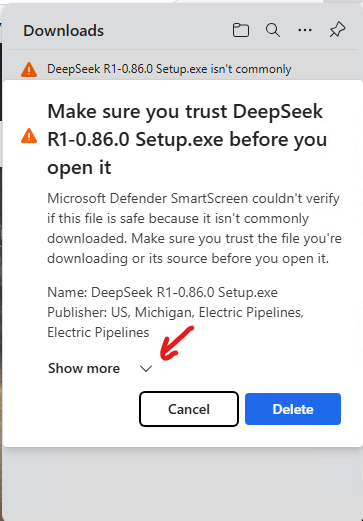
    Step 2: “DeepSeek Isn’t Commonly Downloaded” (We Know, Microsoft)

    Once the download finishes, you’ll likely see a message like this:

    This is where Microsoft tries to scare you. They’re essentially saying, “This isn’t from our store, so it must be bad.” Ignore them. Click on Show more.

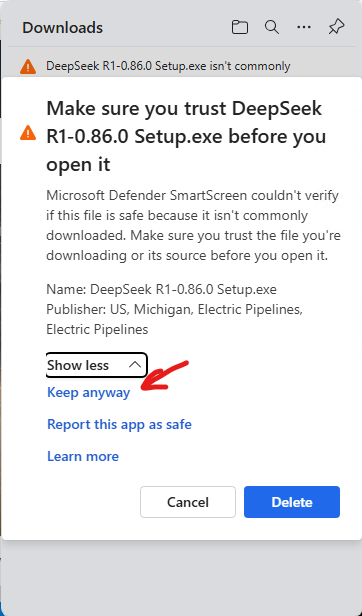
    Click on Keep anyway.

    Step 3: Keeping the File (Because You Want It!)

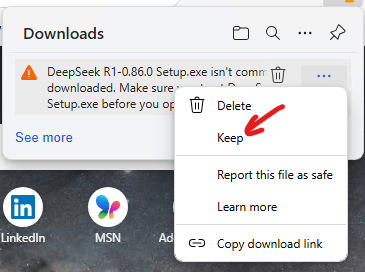
    You might also see a warning in your browser’s downloads bar:

    Click the “…” (three dots) menu next to the download. Then, crucially, select “Keep”. (You wouldn’t be here if you wanted to delete it, right?)

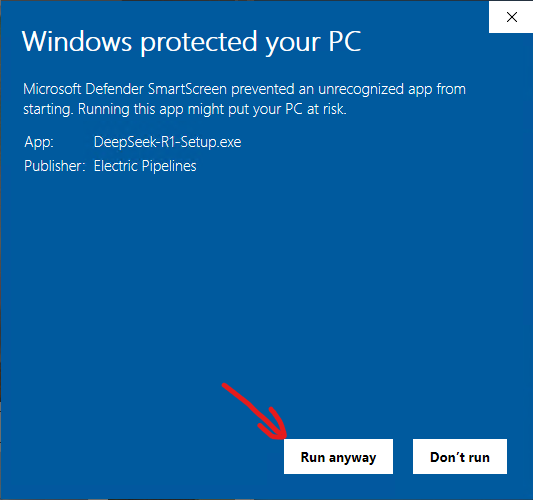
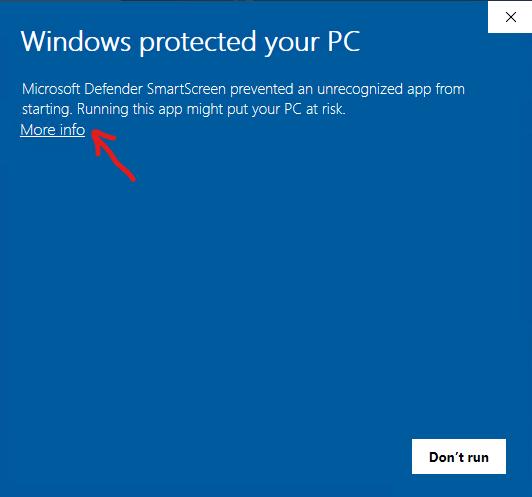
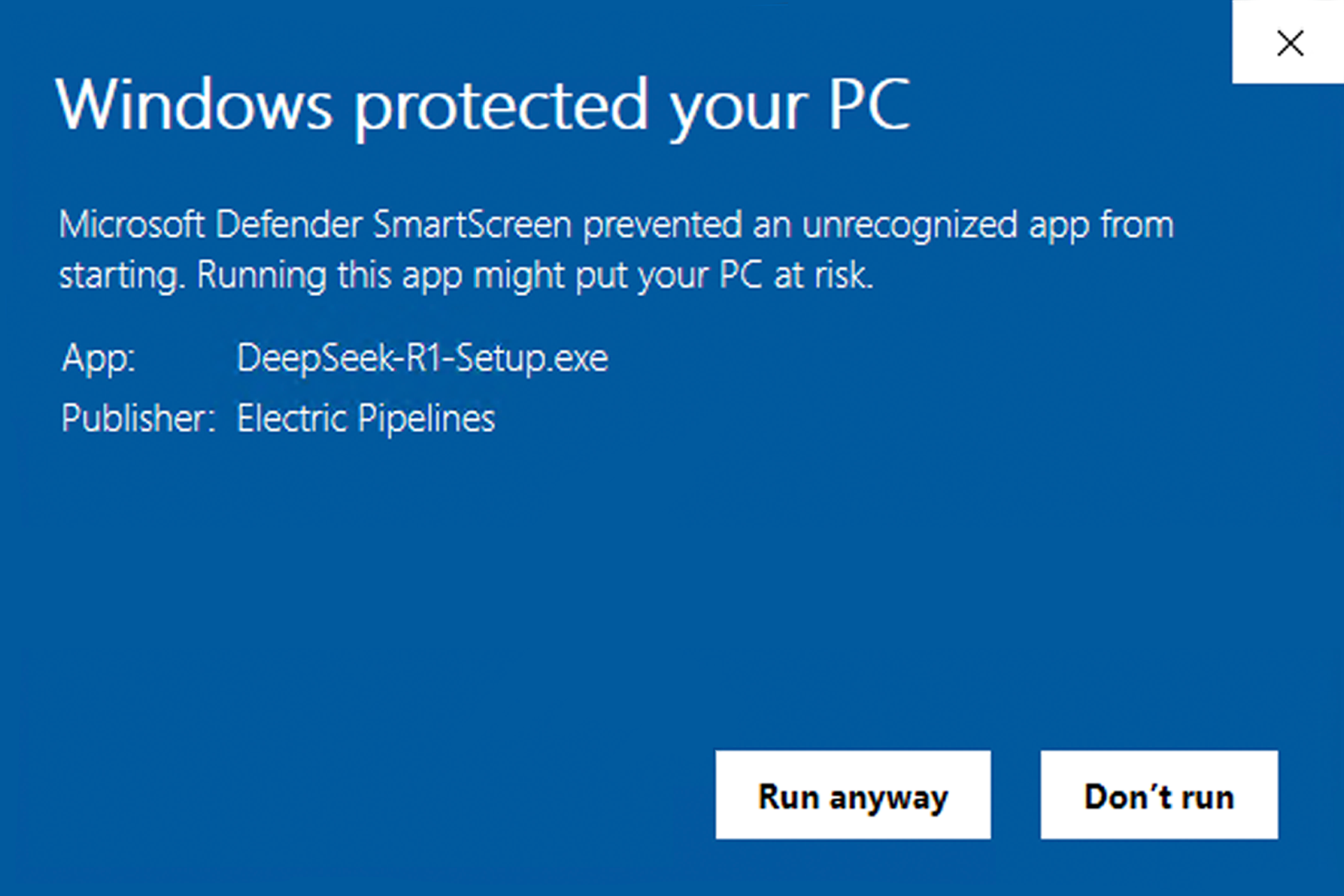
    Step 4: The “Windows Protected Your PC” Message (One Last Try)

    If the Run Anyway button appears, click on it.

    If the Run Anyway button does not appear, click on the More info link.

    Step 5: Finally, Installation!

    After you’ve successfully navigated Microsoft’s obstacle course, the DeepSeek R1 installer will finally run. Follow the on-screen instructions to complete the installation.

    We’re Here to Help

    We understand that these warnings can be concerning, but we assure you that DeepSeek R1 is safe. Microsoft’s tactics are designed to push users towards their own ecosystem, not to protect them from legitimate software.

    If you have any further questions or concerns, please don’t hesitate to contact our support team. We’re happy to help you get DeepSeek R1 up and running!

  • DeepSeek Model Capabilities

    DeepSeek Model Capabilities

    DeepSeek Model Capabilities

    Visit Home Page

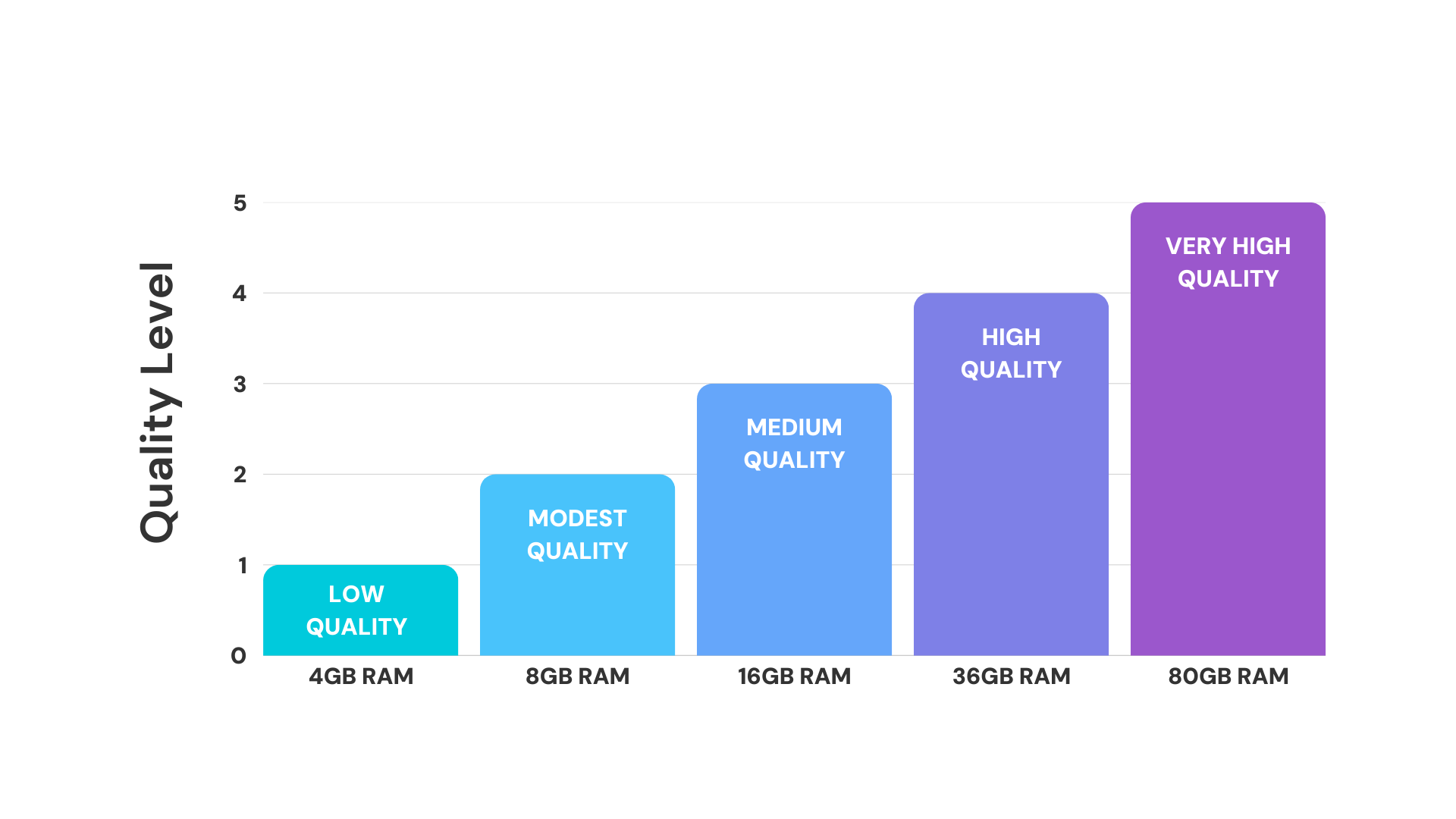
    If you’re looking to see what version of DeepSeek your computer can run, you’ve come to the right place! Below is a table with a breakdown of DeepSeek’s models, capabilities, and the amount of free RAM* is required to run them.

    DeepSeek Models Table
    Model Quality Free RAM Required Capabilities
    Ti
    DeepSeek Titanium
    Highest Quality Cloud Model
    • Peak of AI capabilities
    • Best in class reasoning and analysis
    Pt
    DeepSeek Platinum
    Very High 80+ GB RAM
    • ChatGPT state of the art level performance
    • Excellent reasoning and analysis
    Au
    DeepSeek Gold
    High 36+ GB RAM
    • Strong overall performance
    • Good reasoning and analysis
    Ag
    DeepSeek Silver
    Medium 16+ GB RAM
    • Decent general performance
    • Basic reasoning capabilities
    Br
    DeepSeek Bronze
    Modest 8+ GB RAM
    • Basic conversation abilities
    • Simple task completion
    Cu
    DeepSeek Copper
    Low 4+ GB RAM
    • Basic question answering
    • May give incoherent responses

    We’re Here to Help

    If you have any further questions or concerns, please don’t hesitate to contact our support team. We’re happy to help you get DeepSeek R1 up and running!

    *free RAM, as opposed to RAM in general, refers to the amount of RAM your computer is not already using.